
Flarespeed-optimised
20 sgpt-image-2.5-flare
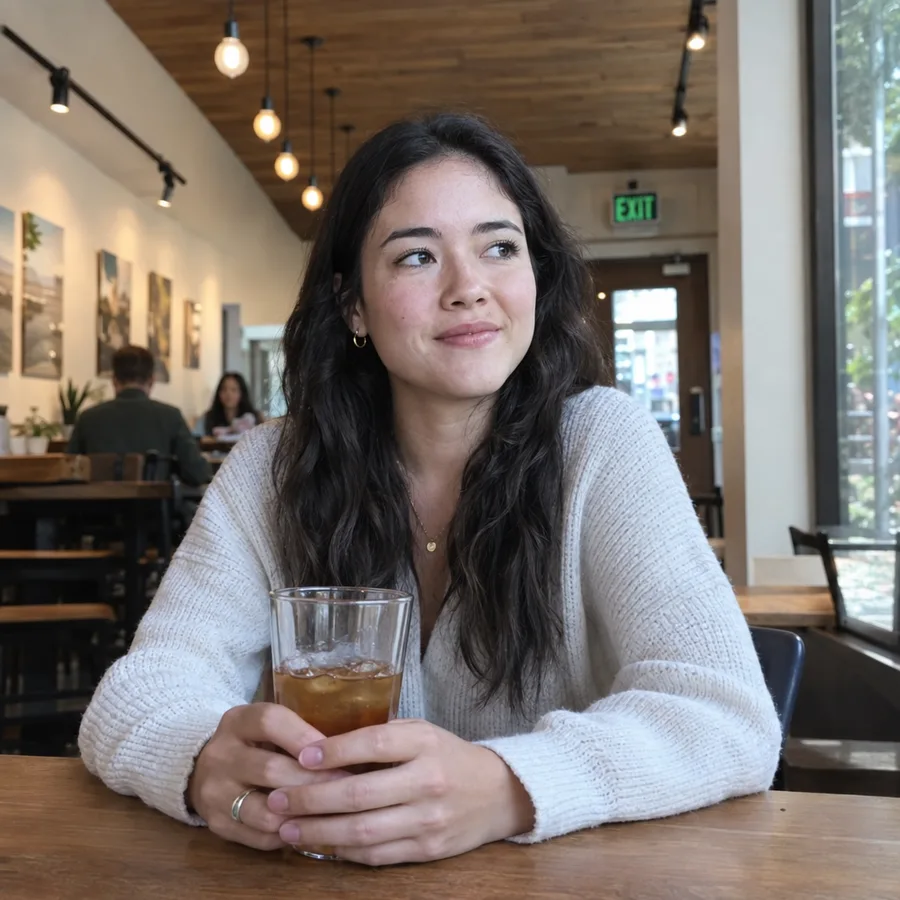 Sample from our benchmark · high · 20 s
One idea. Two models. Compare Flare and Sunburst side by side with the same prompt, size and quality. Pick a real example below, or start with an idea of your own.
Run on
medium · 1024x1024
6 credits for the pair · 3 per model
Content screening refusal: 3 credits when available. Provider content refusal: image credits retained. Technical failures: refunded.
Uses medium quality at 3 credits per image. Original examples keep their published quality.
Quality tier
Credits per image. The same rate applies to both models.
Size
Sample from our benchmark · high · 20 s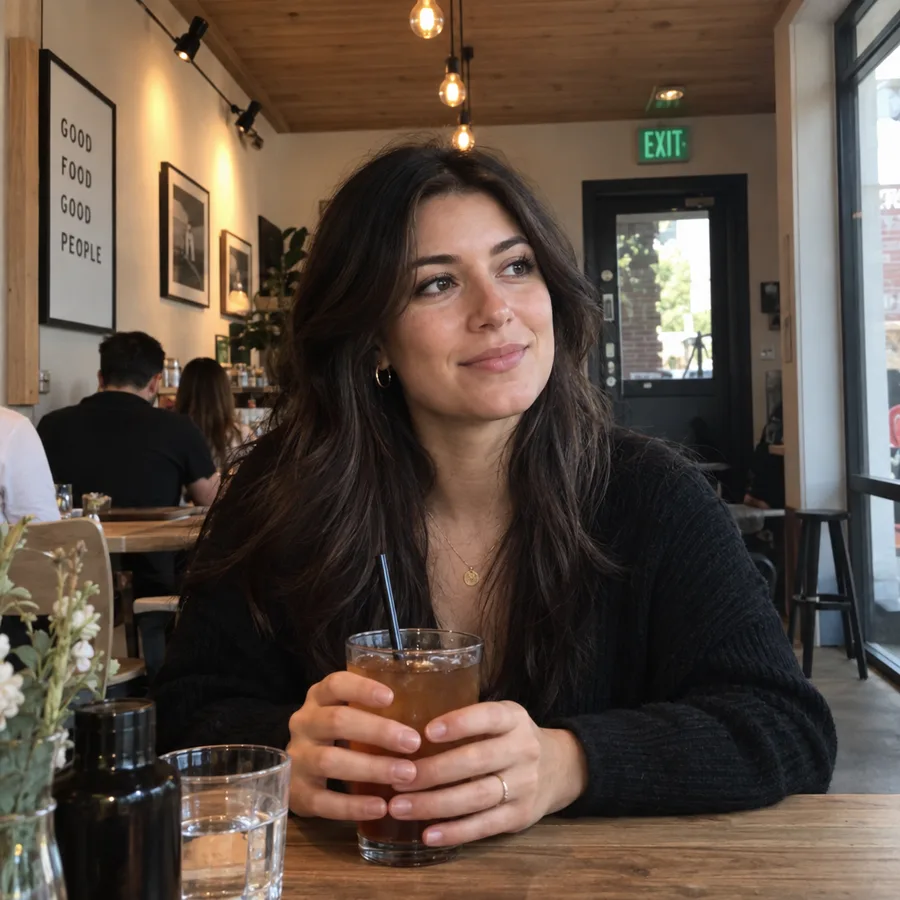 Sample from our benchmark · high · 44 s
Finished images are saved to your account (My creations). Technical failures are refunded automatically. Content refusals follow the content policy.
The short answer
At every tier we ran, both models returned the exact same output_tokens — 196, 439, 1,756, 3,122 and 7,024 — and OpenAI lists the same $30 per million image-output tokens for both. Your bill is decided by the quality tier and size you choose, not by the model.
Cost per image at every tier →Sunburst held a 16-frame character consistent where Flare drifted, and rendered legible poster text and finer skin and hair. It also mounted an EXIT sign beside its door instead of above it — the tell Flare got right. LM Arena separates the two by 22 points.
Sunburst took 13 s against Flare’s 11 s at low quality, and 113 s against 50 s at max. If your product runs low or medium, choosing Sunburst costs seconds, not minutes. The “2× slower” figure people quote only shows up at high and above.
Full latency table, complexity runs and method →Latency by quality tier
Community benchmarks disagree about how fast Flare is — 17 s, 22 s, 35 s — because they ran different quality tiers. We ran the same product-shot prompt at every tier on both models. The ratio climbs steadily from 1.18× at low to 2.26× at max.
| Quality | Flare | Sunburst | Sunburst ÷ Flare | Output tokens (both) | List price / image |
|---|---|---|---|---|---|
| low | 11 s | 13 s | 1.18× | 196 | $0.0059 |
| medium | 10 s | 16 s | 1.60× | 439 | $0.0132 |
| high | 20 s | 35 s | 1.75× | 1,756 | $0.0527 |
| xhigh | 26 s | 54 s | 2.08× | 3,122 | $0.0937 |
| max | 50 s | 113 s | 2.26× | 7,024 | $0.2107 |
1024×1024, text-to-image, one run per cell, single region, 2026-09-12, through an API gateway. Seconds are wall-clock from request to finished image. List price = output tokens × $30 per million, OpenAI’s published rate for both models (checked 2026-09-13); text-input tokens add a fraction of a cent. With n=1 expect run-to-run variation; round two will publish medians.
Full latency table, complexity runs and method
Sources: OpenAI pricing · OpenAI image prompting guide
Same prompt, both models
Three tests from round one, chosen because each one changes a decision. Flare is on the left, Sunburst on the right, at the same tier and size; timings are per image.
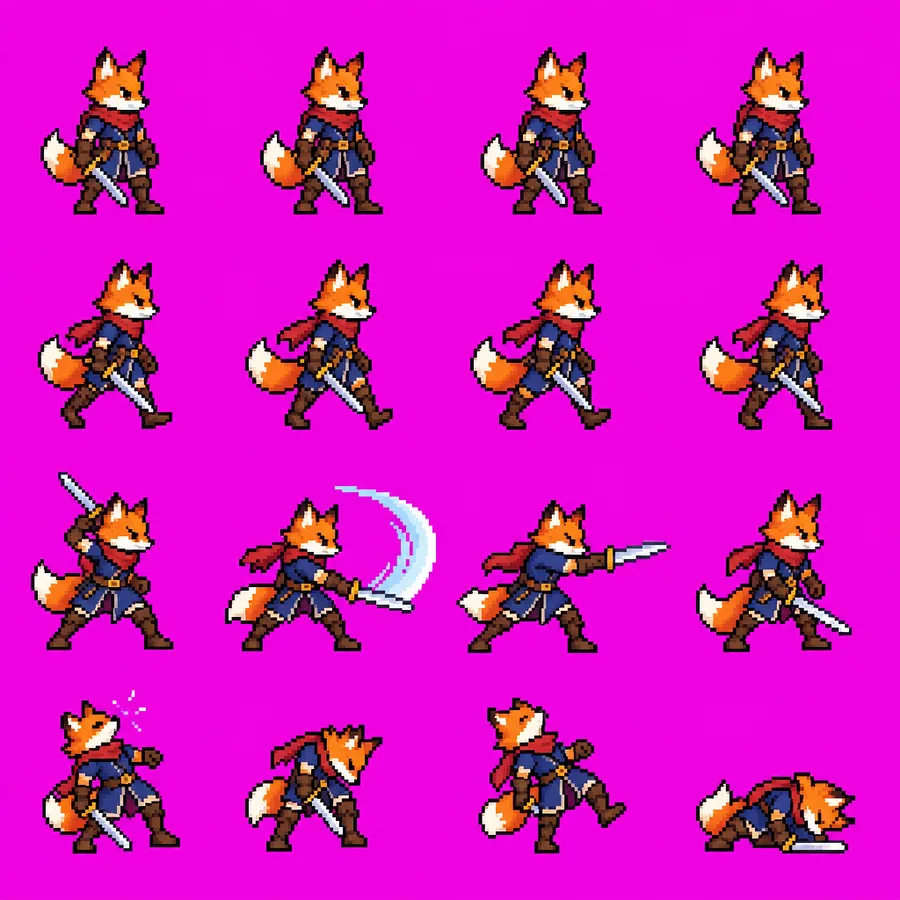
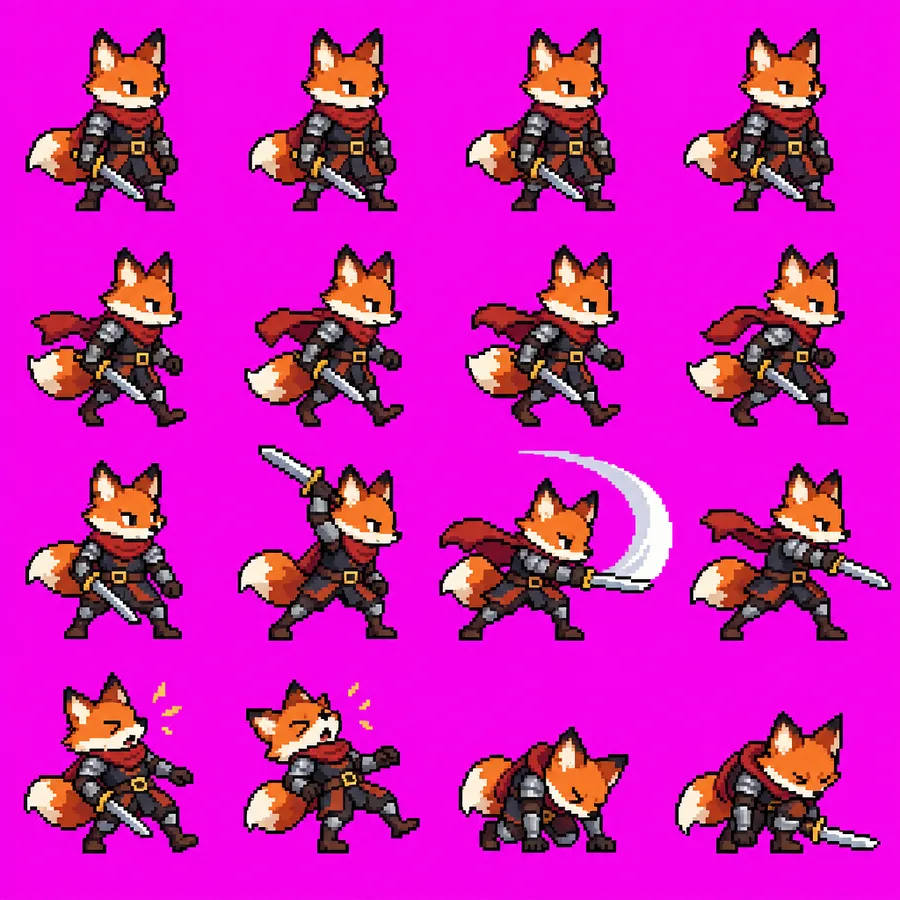
The most-shared GPT Image 2.5 trick on X is the 4×4 combat sprite sheet. Both models delivered four clean rows — idle, walk, attack, hit — on a keyable magenta background. Neither obeyed “uniform cell size, even spacing”, which is exactly why so many people are stuck at “how do I turn this into a GIF”: a fixed-grid slicer cuts through frames. Sunburst kept armour, cape and belt buckle identical across all 16 frames; Flare’s sword changed colour and the character changed size.
Both models · high · 1:1 · 24 credits per pair
Sprite sheet playbookWe wrote a cafe portrait that deliberately bakes in the six “tells” Reddit crowd-sourced from the most-upvoted realism thread of the week. Sunburst won on skin, hair and readable poster text — and mounted the EXIT sign beside the door instead of above it, the single most-upvoted tell in that thread. Flare put it exactly where it belongs.
Both models · high · 1:1 · 24 credits per pair
Photorealistic playbook

Two exclusions gave us a cluttered, golden-hour bookshop with plants, a rug and framed prints. Ten exclusions gave us bare floors and more shelving. The model did not get dumber — half of the ten lines banned the very things that made the first version feel warm. Exclude what would ruin the image, not everything that might appear.
Both models · high · 1:1 · 24 credits per pair
Prompt rulesHow to choose
Start with Flare if your current quality is already acceptable; start with Sunburst when the scene is complex. Once Sunburst passes, run the same prompt through Flare and switch only if quality still passes and the latency gain is real. Both models take the identical prompt, so an A/B needs no rewriting.
Never compare the two models on auto. Each model decides its own effort level under auto, so you would be timing two different jobs. Set low, medium, high, xhigh or max explicitly, and change one variable per run.
Subscriptions renew automatically and can be canceled anytime. One-time credit packs stay valid for one year.
Lite
For casual creators
Pro
For professionals
Ultra
For power users
Playbooks
We collect what the community is doing with GPT Image 2.5, run it on Flare and Sunburst ourselves, and write down what worked, what broke, and which model to use.
Want to check any of this on your own prompt? The studio runs it on Flare and Sunburst side by side and shows you the seconds and tokens. Studio →
The 4×4 combat sheet, the transparent-background trap, why the grid never lines up, and how to get to a GIF anyway.
Read the playbookThe six-point tell checklist from Reddit’s biggest realism thread, scored on both models, plus the reference-image method.
Read the playbook
Seven rules four independent sources agree on, the one rule all four share, and the claims we tested instead of repeating.
Read the playbookDecide
The rest of what we measured, one page per question: how long each tier takes, what an image costs at list price, what each model won and lost, and what changes when gpt-image-1 shuts down.
One reference sheet on Sunburst, every scene on Flare: the two-model workflow, the prompts, and the 16-frame test behind it.
Read the pageSunburst takes 1.18× Flare’s time at low and 2.26× at max. The full table, and why the gap widens as the prompt gets busier.
Read the page$0.0059 at low to $0.21 at max for 1024×1024 at list price, identical on both models to the token, and how to work out yours.
Read the pageBarely slows on busy prompts, passed five of six realism checks, drifted on a 16-frame sheet. What it is for and when to pick it.
Read the pageHeld 16 frames consistent and rendered legible text, but hung the EXIT sign off-centre. What the extra seconds buy.
Read the pagegpt-image-1 shuts down on 2026-10-23, gpt-image-1.5 on 2026-12-01: what changes in the request and which 2.5 model to move to.
Read the pageFAQ
No. OpenAI prices both at $5 per million text-input tokens, $8 per million image-input tokens and $30 per million image-output tokens. In our runs the two models also returned identical output-token counts at every tier — 196 at low up to 7,024 at max for 1024×1024 — so the same request costs the same on either model.
It depends on the quality tier. In our text-to-image runs Sunburst took 1.18× as long at low (13 s vs 11 s), 1.60× at medium, 1.75× at high, 2.08× at xhigh and 2.26× at max (113 s vs 50 s). Complex prompts widen the gap further: Flare barely slowed down on a busy interior, Sunburst added about ten seconds.
If low or medium quality is enough for you, Sunburst — it costs the same and the wait is a few seconds longer. If you run high or above inside something a user is waiting on, start with Flare and only move to Sunburst for the shots where consistency, text or fine detail fail.
gpt-image-2.5-flare and gpt-image-2.5-sunburst. Both support generation, editing and transparent backgrounds through the Images API, and both accept the same prompt unchanged.
auto, low, medium, high, xhigh and max. The xhigh and max tiers are new in 2.5 — earlier GPT Image models stopped at high. Max cost us about 36× the output tokens of low for the same 1024×1024 prompt, so treat it as a deliberate choice, not a default.
Any width×height where both sides are multiples of 16, the aspect ratio is at most 3:1, no side exceeds 3,840 px and the total is between 655,360 and 8,294,400 pixels. Presets include 1024×1024, 1536×1024, 1024×1536, 2048×2048, 2048×1152 and 3840×2160. Bigger sizes cost more tokens on both models equally.
No. In our photorealistic test Sunburst produced better skin, hair and legible text, but placed the EXIT sign beside the doorway instead of above it — the most-upvoted tell in Reddit’s realism thread — while Flare placed it correctly. Treat “quality-optimised” as a tendency, and run a checklist on whichever model you use.
No. Both models take the identical prompt, size and quality parameters, which makes an A/B trivial: send the same request twice with a different model string. Set the quality tier explicitly rather than auto so both jobs do the same amount of work.
Both are being retired: gpt-image-1 on 2026-10-23 and gpt-image-1.5 on 2026-12-01. When you migrate, drop the input_fidelity parameter — it is not accepted by GPT Image 2 or 2.5 — and pick a 2.5 tier explicitly rather than relying on the old default.
Through the Images API on 2026-09-12, 1024×1024, one run per cell, from a single region in a single time window, via an API gateway. Seconds are wall-clock from request to finished image. Costs are recomputed from output tokens at OpenAI’s list price. With n=1 expect run-to-run variation; the scripts and prompts are published so anyone can rerun them, and round two will report medians.