
GPT Image 2.5 Sprite Sheets: Flare vs Sunburst
The 4×4 combat sprite sheet everyone shares, generated on both GPT Image 2.5 models: what each got right, why the grid never lines up, and how to reach a GIF.
Last updated: 2026-09-13
Pixel-art sprite sheets are the GPT Image 2.5 trick that travelled furthest on X: a 4×4 sheet of a character's combat animation from one generation, then "any character reference → 4×4 pixel fight sheet" a day later. The replies under both posts ask the same two things — why is my transparent background broken? and how do I turn this into a GIF? We ran the same sheet on Flare and Sunburst to answer both.
The test
One prompt, high quality, 1024×1024, both models, one run each:
A 4x4 grid pixel-art sprite sheet of a single fox warrior character in combat animation frames: idle, walk, attack, and hit reactions, four frames per row. Consistent character design, outfit and palette across every frame. Uniform cell size, even spacing, flat solid magenta background for easy keying. Crisp pixel edges, no anti-aliasing, no text, no labels.
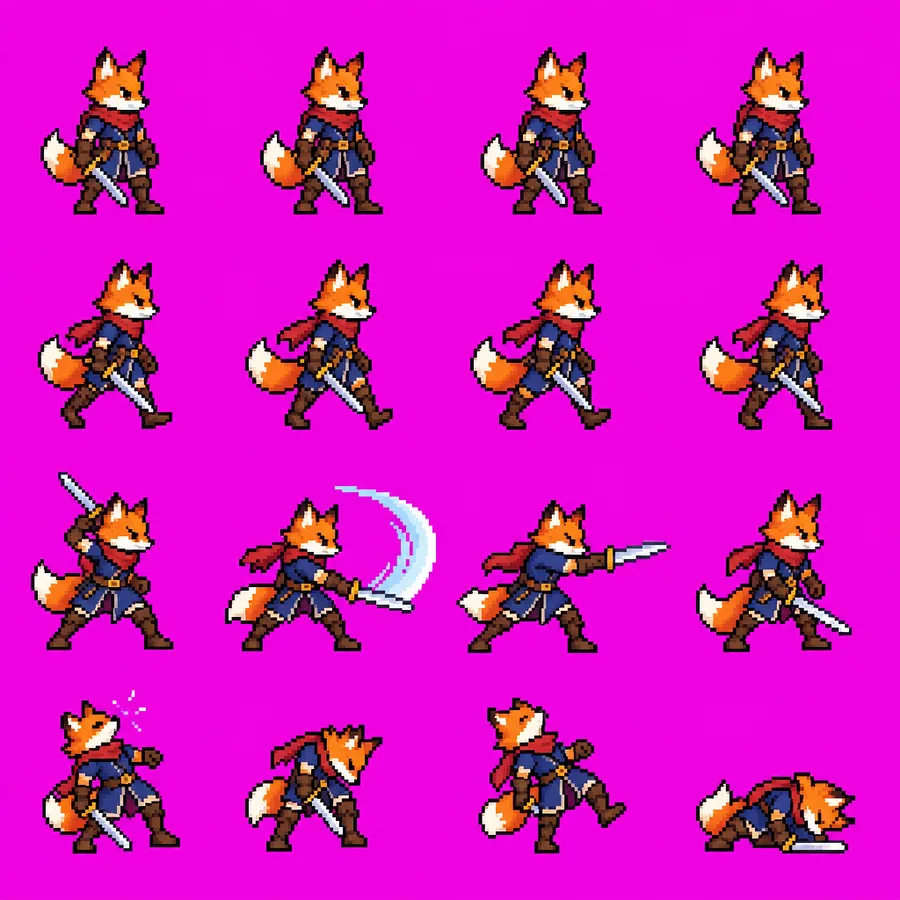
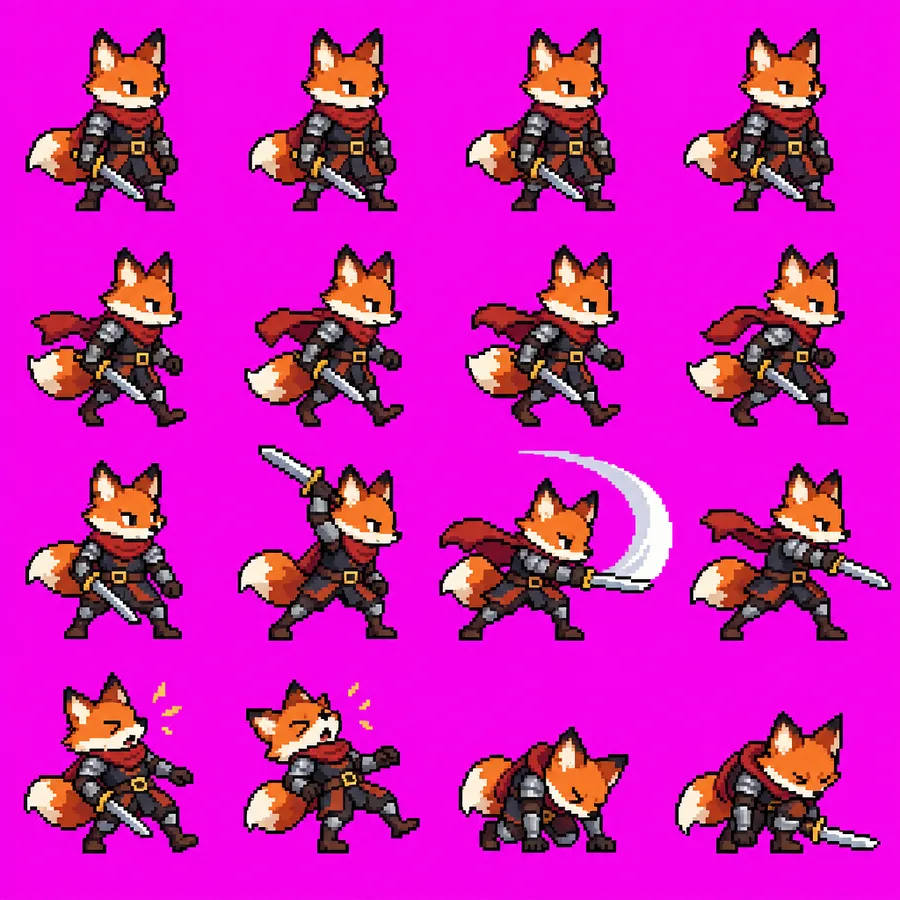
Flare finished in 24 s, Sunburst in 47 s. Both billed 1,756 output tokens — about $0.053 each at OpenAI's list price.
What each model got right
| Check | Flare (24 s) | Sunburst (47 s) |
|---|---|---|
| 16 frames in a 4×4 layout | ✅ | ✅ |
| Rows grouped by action (idle / walk / attack / hit) | ✅ four clear rows | ✅ four clear rows; the hit frames get a star burst |
| Character consistency across frames | ⚠️ the sword changes colour and the character changes size | ✅ armour, cape and belt buckle held in all 16 |
| Flat, keyable background | ✅ | ✅ |
| Uniform cell size, even spacing | ❌ | ❌ |
If the sheet is the deliverable, use Sunburst. Consistency is the whole point of a sprite sheet, and it was the one row where the models clearly differed. Twenty extra seconds on a one-off asset is nothing. Use Flare while you are still deciding on the character — it gets you the next candidate twice as fast at the same price.
Why your slicer cuts through frames
Both models ignored "uniform cell size, even spacing". Cells vary in width, sprites sit off-centre, gutters are uneven. That single miss explains the most common question in the threads: people expect to chop the image into 16 equal tiles and get a GIF, and the tiles come out with a foot in one frame and a sword in the next.
This is a model limitation, not a prompting mistake — we asked for even spacing explicitly and neither model complied. Plan for it:
- Slice by bounding box, not by grid. Key out the flat background, find the connected blobs of non-background pixels, sort them into rows and columns by their centres, and crop each blob with a fixed margin. Any sprite cutter that detects sprites works; anything that divides the width by four does not.
- Or let the model do the alignment in a second session. This is the workaround from the original X thread: when the transparent output failed, the author opened a new conversation, handed it the finished sheet, and asked it to knock out the background, split the 4×4 grid, align the frames and assemble the GIF. A fresh session with one clear job succeeded where the original one kept failing.
- Order the frames yourself. Row order was correct in both outputs (idle, walk, attack, hit), so once you have 16 crops the animation order is simply reading order.
Transparent backgrounds
OpenAI's guidance is to request background: "transparent" with PNG or WebP output, then inspect the alpha channel around hair, glass, shadows and object edges. Community results with sprite sheets are mixed — the transparency request is the step that most often fails.
What worked for us was not asking for transparency at all: a flat magenta background keyed cleanly on both models, and pixel art with no anti-aliasing has no soft edges to lose. If you want transparency straight from the model, treat it as a separate pass on a finished sheet rather than part of the generation prompt.
Prompt notes that mattered
- Say "single character" and repeat the consistency constraint. "Consistent character design, outfit and palette across every frame" is what kept Sunburst on-model. Flare still drifted, so on Flare add a reference image of the character.
- Name the actions per row. Both models honoured "idle, walk, attack, and hit reactions, four frames per row".
- Ban text and labels explicitly. Neither model added captions once told not to; sheets without that line tend to grow frame numbers.
- "Crisp pixel edges, no anti-aliasing" produced genuinely hard-edged pixels, which is what makes keying and upscaling painless.
The same pattern: stop motion
The sheet trick generalises. People are generating 36 frames of a clay character hatching and breathing fire and assembling a three-second GIF from them. The workflow is identical — one generation, many frames, external assembly — and so are the caveats above.
FAQ
Can GPT Image 2.5 output a GIF or an animation directly? No. It returns still images. The sprite sheet is one still image; slicing and assembling frames happens in your own tools.
Which model should generate the sheet? Sunburst, for consistency. Use Flare to iterate on the character design first. The consistent-characters workflow chains the two: one reference sheet on Sunburst, every scene on Flare.
Will a bigger size fix the uneven grid? Untested. Since neither model followed the spacing instruction at 1024×1024, we would not expect size alone to fix it; bounding-box slicing is the reliable route.
Sources
- The combat sprite-sheet post on X and the reference-to-sheet follow-up
- Stop-motion frames → GIF
- OpenAI image prompting guide — transparent backgrounds and alpha checks
- Our run:
high, 1024×1024, 2026-09-12, one run per model; both images above are the unedited outputs.