
GPT Image 2.5 Consistent Characters: Sunburst + Flare
Consistent characters in GPT Image 2.5 with both models: build the reference sheet on Sunburst, run the scenes on Flare, and the 16-frame test that shows why.
Last updated: 2026-09-20
Every Flare-versus-Sunburst comparison ends with "pick one". For character work that is the wrong question. The best consistency workflow we have seen for GPT Image 2.5 uses both models, in a fixed order: Sunburst builds the character reference sheet once, Flare runs every scene with that sheet attached. One slow, careful generation, then dozens of fast ones. This page lays out the workflow, the prompts, and the first-party test that explains the division of labour.
The short version
- On Sunburst, generate a single 4×4 reference sheet of the character: front, back and side views, a few expressions, close-ups of costume details, on a plain white background.
- On Flare, generate each scene with that sheet attached as a reference image and one line of text: same character, same jacket, same face.
- Restate the consistency line in every scene prompt. Constraints do not carry over between requests.
The commenter who first described this workflow under Reddit's GPT Image 2.5 prompt guide ran six scenes this way and reported zero drift and zero reruns. We have not reproduced the six-scene test yet; what we have run is the test that shows why the order matters.
Why Sunburst makes the sheet
The reference sheet is the one asset in the pipeline where inconsistency is fatal, because every scene inherits it. Our sprite-sheet test is the closest thing we have to a controlled consistency benchmark: the same 16-frame prompt on both models at high, 1024×1024, one run each.
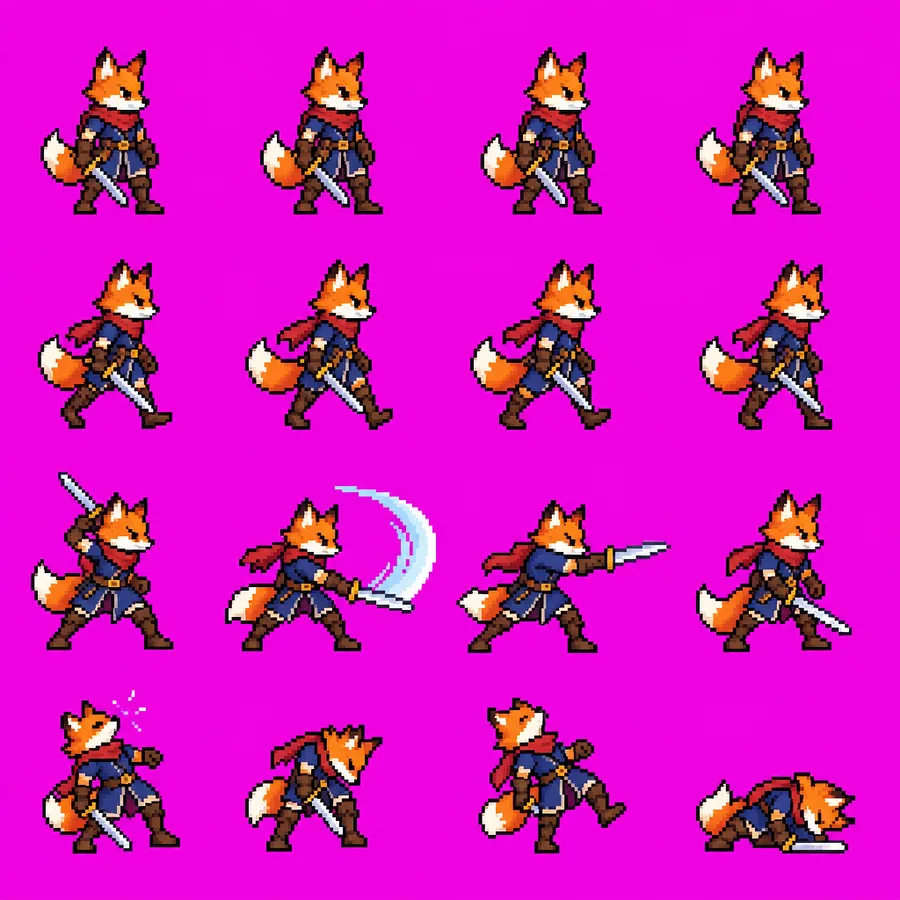
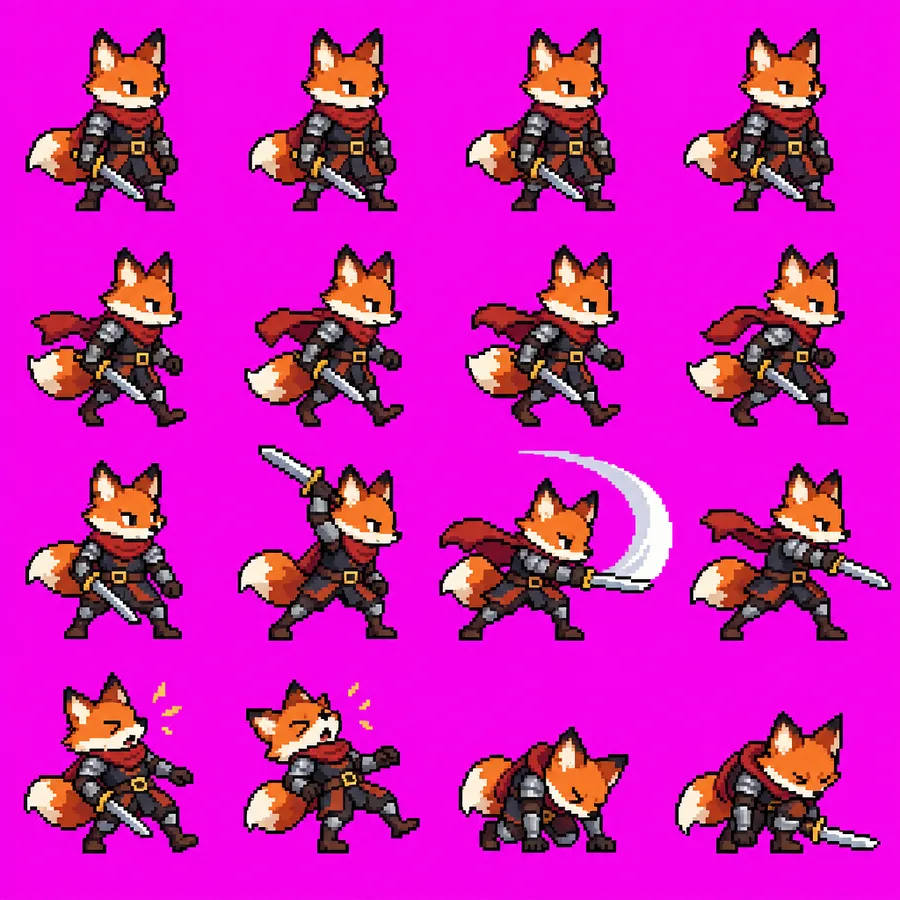
Sunburst held the armour, the cape and the belt buckle across all 16 frames. Flare delivered the same four rows of actions but drifted: the sword changed colour between frames and the character changed size. That is exactly the failure a reference sheet exists to prevent, so the sheet goes to the model that did not drift. Sunburst took 47 s against Flare's 24 s and both billed 1,756 output tokens — twenty-three extra seconds, once, for the asset everything else depends on.
One detail from that test works in your favour here. Neither model produced a uniform grid; cells vary in size and spacing (see the sprite-sheet page for why that breaks slicers). A reference sheet is never sliced. The whole image is handed to the next generation as one reference, so the uneven grid that ruins a sprite sheet is irrelevant to a character sheet.
Why Flare runs the scenes
Scenes are where the volume is: ten, thirty, a hundred generations, each one a candidate you might throw away. Flare returned every high-tier image in our round-one runs in 20–25 s regardless of prompt complexity — a plain product shot in 20 s, a busy bookshop in 25 s, the 16-frame sheet in 24 s — while Sunburst went from 35 s to 47 s as the prompts got busier. At the same list price per image, that is the difference between a scene every 20 seconds and a scene every 45. Full table on the speed page.
The consistency work has already been done by the sheet. What Flare has to do is follow a reference, and OpenAI's prompting guidance is built around that: give each reference image a role, say what it controls, and name the traits that must survive.
Prompts
Step 1 — the sheet, on gpt-image-2.5-sunburst. Name the deliverable first, then the views, then the constraint.
A character reference sheet for one character: [describe the character — age, build, face, hair, the exact outfit]. 4×4 grid on a plain white background. Row 1: full-body front, back, left side, right side. Row 2: head-and-shoulders portraits — neutral, smiling, angry, surprised. Row 3: close-ups of the jacket, the boots, the hands, the hair. Row 4: three-quarter view walking, sitting, pointing, running. Same face, same outfit, same proportions and colours in every cell. No text, no labels.
Check the sheet before you use it: outfit colours identical across cells, the face recognisably the same person in every portrait, nothing invented in one cell that is missing from the others. If a cell is wrong, fix that cell with an edit rather than regenerating the whole sheet — one change, then the list of what must not move (see prompt rules).
Step 2 — each scene, on gpt-image-2.5-flare. Attach the sheet, assign it a role, and describe the scene.
Image 1 is the character reference sheet. Keep this character's face, hair, body proportions and the exact outfit — the same jacket, the same boots — from image 1. New scene: [the scene — setting, action, camera, light]. The character is the only thing taken from image 1; the setting, lighting and composition are new.
Step 3 — repeat the constraint every time. Every request starts from zero. If scene four's prompt says "the same character" but not "the same jacket", the jacket is fair game.
Where prompting stops and compositing starts
OpenAI's guidance is explicit that pixel-level consistency is not something prompting can guarantee: repeated generations and edits may still change details you did not mention. A reference sheet gets you a character that reads as the same person across a series. It does not get you a logo on the jacket that is identical to the pixel, or a prop that is the same object in every frame. For those, composite: generate the scene with the element left plain, then add the exact asset in an editor.
What we have and have not verified
- Verified by us: Sunburst held a 16-frame character consistent where Flare drifted, at the same tier, size and prompt.
- Verified by us: Flare's generation time stayed within 20–25 s across four different
high-tier prompts while Sunburst's grew with complexity. - Reported by one community author, not yet reproduced here: six Flare scenes from one Sunburst sheet with no drift and no reruns.
- Untested: whether Flare, given the sheet, matches Sunburst's consistency on the scenes themselves. That is the next experiment. If Flare drifts even with a reference, the answer changes to Sunburst for the scenes too.
You can run step 1 on either model in the studio: same prompt, your choice of model, seconds and tokens reported per image. Step 2 needs an image input, which means the Images API rather than the studio.
FAQ
Can I skip the sheet and just describe the character in every scene? You can, and drift is the usual result: a description leaves room for interpretation and each generation interprets afresh. The sheet replaces a description with a picture, which is why one author got six scenes without a rerun.
Why not make the sheet on Flare too? Because the sheet is the one image where drift compounds. In our 16-frame test Flare drifted and Sunburst did not. Twenty-three extra seconds, once, is the cheapest insurance in the workflow.
Does the sheet have to be 4×4? The community workflow used 16 cells and so did our sprite-sheet test. Fewer cells means fewer angles to pull from; more cells at 1024×1024 means smaller, less useful cells. We have not tested other layouts.
Should the sheet be transparent? No. A plain white background is what the workflow used, and transparency is the request that most often fails in community sprite-sheet reports. White keys out easily if you ever need it to.
Does this cost more than a single model? No. Both models bill the same output tokens for the same request, so the only cost of the two-model workflow is Sunburst's extra seconds on step 1. See the cost page.
Sources
- Reddit prompt guide, part 3 — the six-scene workflow is a commenter's report, n=1, not reproduced by us
- OpenAI image prompting guide — reference-image roles, restating constraints, compositing for pixel-level consistency
- Our sprite-sheet run:
high, 1024×1024, 2026-09-12, one run per model; the images above are the unedited outputs